Hello, tandem.
I've been thinking & writing a lot about Zoomable User Interfaces and now and then I mentioned tandem, the project I've been working on & off, exploring the different concepts behind ZUIs.
Well, finally, after the last few weeks of hard work (and a lot of fun), I'd like to present you on where I am today:
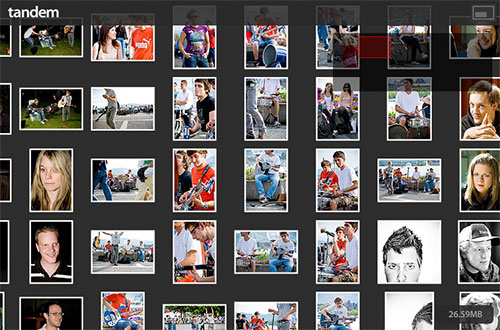 Try it out for yourself at http://tandem.gasi.ch/
RTFM
tandem is very easy to use. Simply use your mouse wheel to zoom in and out on the photos and click & drag to move around. However, in my opinion, there's even a cooler way to zoom around and that is by using your keyboard. Be sure to click inside your browser first and then use the arrow keys or W, A, S, D to move around and the + & – keys on your Numpad or alternatively I & O to zoom in and out. And yeah, if this is to slow for you, simply hold down the Shift key while pressing the other keys. Dive in to see a photo in better quality and if you like it, an innocent double click will take you to the original on Flickr so you can manifest your appreciation for the photo and the artist in a comment.
You
Although I love tandem, it is really not about me. If you have a Flickr account (otherwise hurry up and get one), you can use tandem to explore your own photos in a new way . Simply type http://tandem.gasi.ch/#/ and then add your personal Flickr address to view your own photos. For example, my personal address is either http://tandem.gasi.ch/#/photos/72389028@N00/ or the much nicer shortcut http://tandem.gasi.ch/#/gasi/.
Check out some of my favorite streams: http://tandem.gasi.ch/#/norablue/ http://tandem.gasi.ch/#/tg81/ http://tandem.gasi.ch/#/darkshapesprowl/ http://tandem.gasi.ch/#/patric_shaw/
Open
To me, personally, tandem is much more than a fun way to browse through photos. Since I started exploring this idea almost a year ago — can't believe it's been so long — I have learned a lot and I mean a lot. Two complete rewrites later, namely this and that one, I have come to a point where I am more or less happy with the architectural foundation of the application — which is more than an aspiring Computer Scientist could ask for — and therefore I am making tandem open source as of today.
I've made this decision early on when I saw my fascination for ZUIs grow stronger from day to day. It means several things to me. First, giving back to the community I've learned so much from, by giving interested individuals a view behind the scenes of how I approach development and to show that Flash applications aren't dark magic. Second, this is a longer-term commitment to the ideas behind this project. Where I am spending my summer has a lot to do with this, although believe me when I tell you that this deserves at least another whole post for itself. Third, it's my first step into the fascinating world of open source development.
Roadmap
What you see today is not the end, it's just the beginning. I have a lot of ideas that I want to see realized in tandem that, at the moment, are only sketches on paper lying around all over my room. Besides that, there's obviously a lot to fix around memory management (I know, I am quite bad at cleaning up after myself) as well as replacing all my favorite naïve implementations of certain algorithms & data structures. Sorry, Prof. Dr. Widmayer.
Behind the Scenes
Like I said, the application is online, spread the word and let me know what you think. Then, the entire source code is available at http://code.google.com/p/tandem/ under the GNU Affero General Public License Version 3 or at http://tandem.gasi.ch/source/ if you bother checking it out. Enjoy.
Attention: If you appreciate the kind of experiences that tandem and other Flash applications offer, please take a minute to vote on this bug in the upcoming Firefox 3 that basically cripples keyboard support in Flash. Thanks.