Inline Multiscale
Image Replacement
How will we view and publish images on the web in 5 years?
Today I’d like to share with you my vision of how we could improve the publication and viewing of high-resolution images on the web. Before discussing what this vision entails, I’d really like you to explore it yourself.
Scenarios
The following are three real-world scenarios for publishing high-resolution images on the web: news, blogs and photo sharing. Explore any one or all of these scenarios and interact with the images within… Come on, let’s get your mouse wheel spinnin’!
News: The New York Times
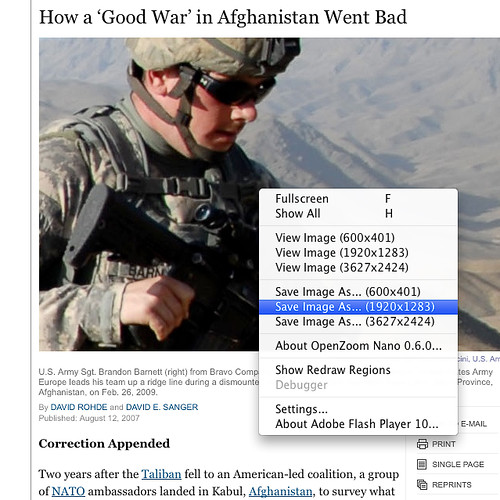
View Demo | View Original PageDisclaimer: Since a high-resolution version of the original image was not available to me, I replaced it with another one from the Department of Defense which was taken in the same region, called Zabul Province.
Blogs: Information Architects
Photo Sharing: Flickr
View Demo | View Original PageDisclaimer: Due to conflicts, the original JavaScript that was included in the page was removed for this demo.
Vision
The solution for publishing high-resolution images on the web I set out to develop had to have the following qualities…
For Users
- The user shall not pay, in terms of time or bandwidth, for large images she’s not interested in.
- The solution shall degrade gracefully, e.g. fall back to status quo, for users that do not meet the technical requirements.
- The solution shall offer a vastly enhanced experience for viewing high-resolution images on the web, including full screen support while retaining as many of the standard interactions with images as possible.
- The user shall not be taken out of the context she was working in.
For Publishers
- The solution shall offer simple publishing of high-resolution images and turn their exploration into an awesome experience!
- The solution shall be as much backwards- & forwards-compatible as possible.
Solution
The solution I developed, based on something I started to call Inline Multiscale Image Replacement, is a combination of three different technologies from the OpenZoom project, together known as OpenZoom Endo:
- OpenZoom Caral: A Python tool to batch convert images into a multiscale image format based on the OpenZoom Description Format and Microsoft Deep Zoom.
- OpenZoom Nano: A light-weight multiscale image viewer running in the Adobe Flash Player and built with the OpenZoom SDK.
- OpenZoom Endo: A script performing progressive enhancement on new and existing HTML pages. It is written in JavaScript and packaged as jQuery plugin.
Features
- Simple publishing of high-resolution images on the web, even on existing pages.
- Continue to use interactions your already familiar with such as Save Image As… and View Image. (Screenshot)
- Progressively enhance your browsing experience, with graceful fallback for those of you with browsers that are not JavaScript or Flash enabled.
- Never download more data than you currently look at.
- Take advantage of your entire screen real estate by using the full screen mode.
- Explore the full glory of high-resolution images without ever leaving their page.
- Publish images in different sizes from the same source image.
- Free! …as in beer and freedom!
Released under the GPLv3 open source license.
Known Issues
Of course, as with any fresh-out-of-the-oven technology there a couple of things that don’t work as intended. Here’s a list of known issues:
Image replacement can be delayed by large pages, resulting in a visible page flicker.
At this point, OpenZoom Endo does not pass the W3C validator due to the custom attribute (XHTML namespaces & custom DTDs, anyone?)
Ideally, the viewer would initially feature some visual cues that convey the enhanced functionality. Add some simple controls to that. Designer, anyone?
Script sometimes conflicts with existing JavaScript within the same page.
Multiple replacements of images cause performance problem related to Flash Player plugin instantiation.
Images sometimes fail to load due to plugin activation issues.
Walkabout
Let me quickly guide you through the basic process of publishing a high-resolution image on your web page:
- First, use Python and the OpenZoom Caral library to convert your image into a multiscale image pyramid and optionally define additional sizes of your image you’d like to publish or offer for download:
import openzoom creator = openzoom.ImageCreator() creator.create("awesome.jpg", "awesome", [0, 600, 1920])- Reference jQuery library (e.g., using Google) and the OpenZoom Endo script in your HTML page:
<script type="text/javascript" src="http://ajax.googleapis.com/ajax/libs/jquery/1.2.6/jquery.min.js"></script> <script type="text/javascript" src="openzoom-min.js"></script>- Place the OpenZoom Nano viewer SWF (
OpenZoomViewer.swf) file into the same directory as your page.- Add the image to your HTML page and annotate it with the special
openzoom:sourceattribute:
<img src="awesome/awesome-600x320.jpg" width="600" height="320" openzoom:source="awesome/image.xml"/>- Enjoy hassle-free high-resolution imagery on the web!
Download & Source
- Download OpenZoom Endo (808kb) from Google Code.
- Have a look at the source code on the OpenZoom Google Code repository.
You
I want your feedback! Let me know if my idea works for you… If it doesn’t, why not?… How could things be improved? I am listening. If you’re a JavaScript hacker, take apart my code and share with me what could be done better! If you’re a designer, consider contributing to a better interface for the viewer for an even better user experience! If you’re an iPhone user, let me know if my solution breaks when you check out one of the previous demos! If you think this is b#$($*, then share your vision of the future of high-resolution images on the web with me!
As always, if you have feedback, questions or want to start a dialogue, feel free to leave a comment down below, head over to the awesome OpenZoom Get Satisfaction site or follow me on Twitter: @OpenZoom and @gasi. In case you find a bug, please file a bug report in the OpenZoom Google Code Bug System.
Epilogue
With this and my other work on the OpenZoom project, I want to explore new ways of interacting with visual information on the web. Join me and let’s explore how the future of browsers with the appropriate image formats that support high-definition images could look & feel like!


08.04.2009
0:38
I’d love to know your opinion on our deepzoom experiments: http://www.zoomery.com
10.04.2009
16:21
[...] Inline Multiscale Image Replacement [...]
18.04.2009
19:29
Hi Daniel,
I like your idea. I am going to speak about your OpenZoom project next week in the European Library Automation Group conference…
Maybe interesting information for you:
Your OpenZoom SWF viewer (which is accessing zoomify tile format) is compatible with the image server we are publishing as a result of our http://help.oldmapsonline.org/ project.
Example presentation is here – you are looking at 300 MB TIFF image file – which was NOT cut to tiles in advance:
http://www.oldmapsonline.org/publish/openzoom/iipopenzoom.html
The image server allows you to generate the tiles on the fly for any TIFF or JPEG2000 file you have on a server. Especially the JPEG2000 is interesting because it saves huge amount of space!
Our server is based on IIPImage and it is open-source project (GPL).
We should once go together for a beer in Zurich
21.04.2009
16:04
Hi Danel,
Nice technique. But your image replacement is too perfect that users might not aware that the image is “replaced”. Hence, they might not know they can zoom in&out.
BTW, how do I zoom out? The only way I saw is pressing “H”.
As of UI, I think users need some hints or visible controls over the replaced image. Doesn’t have to be google-maps-like crazy UI…maybe something subtle, like single click to zoom in, double click to zoom out, and drag to pan, with on-screen instructions.
Just my 2 cents.
21.04.2009
20:00
[...] Inline Multiscale Image Replacement | OpenZoom [...]
22.04.2009
6:07
This is a very good technique, but I agree with Leo it needs to be immediately obvious that the user has the ability to zoom in. Otherwise all the hard work might be missed. Perhaps the cursor could be a magnifying glass or something like that.
I recently created something very similar before I heard about OpenZoom, here:
[ http://www.peteralexander.com.au/PA_Product_Detail.process?Merchant_Id=1&Product_Id=1432902&Colour=Deep%20purple ]
My version has a watch cursor so you know something is loading in the background then zooms automatically on rollover. The slow zoom effect gives the user an instant knowledge that they are zooming and a standard hand cursor can be used to pull and drag the zoomed image around.
22.04.2009
12:51
Leo & Davide,
Thank you both for your feedback. You’re both spot on, there definitely needs to be some kind of affordance to let the user know that an image is special.
Leo, I had to smile when you said it’s too perfect. I’ll try to take this as a compliment.
A bit of an obstacle is the fact that I am more developer than designer and have hoped we could turn this into a small community project regarding creating a better interface to this technique. I’ll try to come up with something and I hope I could get your feedback on my progress.
Davide,
I really like your take on such an interface that you’ve posted. I guess, zooming in on mouse over works pretty well for images with a limited size, say 10 to 20 Megapixel. Once you go beyond that it’s just too much panning the user has to perform.
Well, once again, thanks for your feedback and keep an eye on this blog for future revisions of this technique. If you’d like to get involved, please get in touch daniel@gasienica.ch
Cheers,
Daniel
P.S. You can zoom out with Shift-click or by using a mouse wheel in case you have one.
23.04.2009
10:21
I’m not a fan of this, probably half because it uses flash for something that has been proven to work with just javascript (google maps and the like anyone?). I think that this could actually be done much easier in just javascript, and that the use of flash sort of adds overhead.
I do however like the use of the scroll wheel to zoom, although, it should force a non bubbling event, so the browser doesn’t scroll down/up as you zoom in/out. I also think it’d be good to provide the user with some cursors with tips to tell them what to do, eg, the move cursor to tell the user that they can pan about the zoomed in image.
I also feel that there should be a control something that is able to be used to zoom, instead of just the mousewheel, more so similar to google maps’ zoom in/out slider.
I might try and implement this in pure javascript, If I do, I’ll write a blog post about it, and leave another comment here about it.
23.04.2009
11:37
Excellent solution to a problem that doesn’t really exist. While I appreciate that more detail in an image as an option might be attractive, I find it hard to imagine an instance where this might be critical.
I like the idea and execution but I can only see this being used with any consistency on e-commerce sites for products, other than that it seems more beneficial to get the pop-up larger image rather than increasing the details within the same space. perhaps combining the two (pop-up with a zoomable image) would be the winning combo.
As for the user not knowing of it’s existence when seeing an zoom-able image I’m sure a small not in the page flank and an associated icon next to the/place on the image box would let people know.
23.04.2009
13:52
Okay.. to follow up, I have tried out making this in JavaScript, although, from testing, it works rather a lot better using Flash, the mousewheel events and animation are definitely a lot smoother.
That said, I’d like to see if anyone can be the flash version at it’s game.
23.04.2009
14:07
Micheil,
Thanks for trying. Actually, you can come pretty close to the Flash fidelity using JavaScript & canvas and the people from the Seadragon team at Microsoft have done it. Their solution is called Seadragon AJAX. There are two reasons I haven’t used it in my proof of concept:
1.) Licensing is still unclear.
2.) I am not familiar enough with JavaScript to know how to implement a custom context menu.
I am sure both issues can be overcome and we’ll have a more standards based solution. For clarification: Using Flash was always a means to an end. I wanted to demonstrate one possible form of how we could bring high-resolution images to the web. I want to explore the interactions with such images, how to make them visible to users, etc. If this will really happen, I strongly believe it should neither be based on Flash, nor on Silverlight, nor on JavaScript/canvas but directly be integrated into the rendering pipeline of a browser. Obviously for all of that to happen we need to have more suitable multiresolution image formats. But they’re coming.
Once again, thanks for your feedback.
Cheers,
Daniel
08.08.2009
16:20
I’m bookmarking this to take a closer look later. I think this could present an improvement to user interaction with images. Yes, it’s unfortunate that Flash has to be utilized — but from my perspective Javascript is just as unfortunate. Long utilized image replacement techniques such as sIFR have proven the usefulness of Flash in certain scenarios (for more than splash screen animations). As long as it does degrade gracefully, using Flash and/or Javascript to provide enhanced functionality is fine. What I wonder is if you could implement it with several tiers: if Flash is available, utilize it, but if it is not, utilize Javascript with its reduced functionality as Micheil suggested.
Regarding your desire for a user interface, I don’t know if it will help, but there are some extensive free icon sets available at http://www.pinvoke.com/ that include a variety of icons that might be useful. They don’t get bigger than 16×16 though (at least I think not).
12.08.2009
13:14
[...] Daniel Gasienica hat sich Gedanken gemacht, wie Fotos in naher Zukunft online betrachtet werden könnten. [...]
23.08.2009
8:26
Hi! I just created a similar tool, to see a very large picture in multi-scale format. Instead of using Flash or Silverlight, I use html/javascript and Canvas to do this. Check this few hours old code at my GitHub page: http://github.com/fajran/kasuari/tree/master
22.10.2009
8:34
Fajran,
Kasuari looks slick! I apologize for acknowledging your work so late, I literally just now discovered your comment here.
I like your approach using open web standards, e.g. JavaScript & Canvas. Our team has been working on similar technology – are you familiar with Seadragon Ajax from Live Labs? What are your future plans for Kasuari?
Cheers,
Daniel
05.11.2009
14:34
[...] autre outil qui mérite le détour est le « Inline Multiscale Image Replacement ». Voici le principe : le navigateur affiche d’abord une image jpg, puis cette image est [...]
12.01.2010
16:40
I love the idea! I’ve been touting the virtues of high-resolution digital photography for years. I wish I could figure out how to use the zoom in my current flash based website. That would make me very happy. I multi-scale imaging is the future for advertisements, photographs, etc., especially on the forthcoming tablet readers!!!!